

 United Kingdom (UK)
 United States (US)
 Canada
 South Africa
 India
India Australia
 New Zealand
 China
China Russia
 Germany
 France
 Spain
Spain Netherlands
 Vietnam
 United Arab Emirates
 Italy
Italy Poland
 Thailand
 Türkiye










 Algeria



Planning an online ESL lesson: step-by-step guide
Planning an online ESL lesson: step-by-step guide

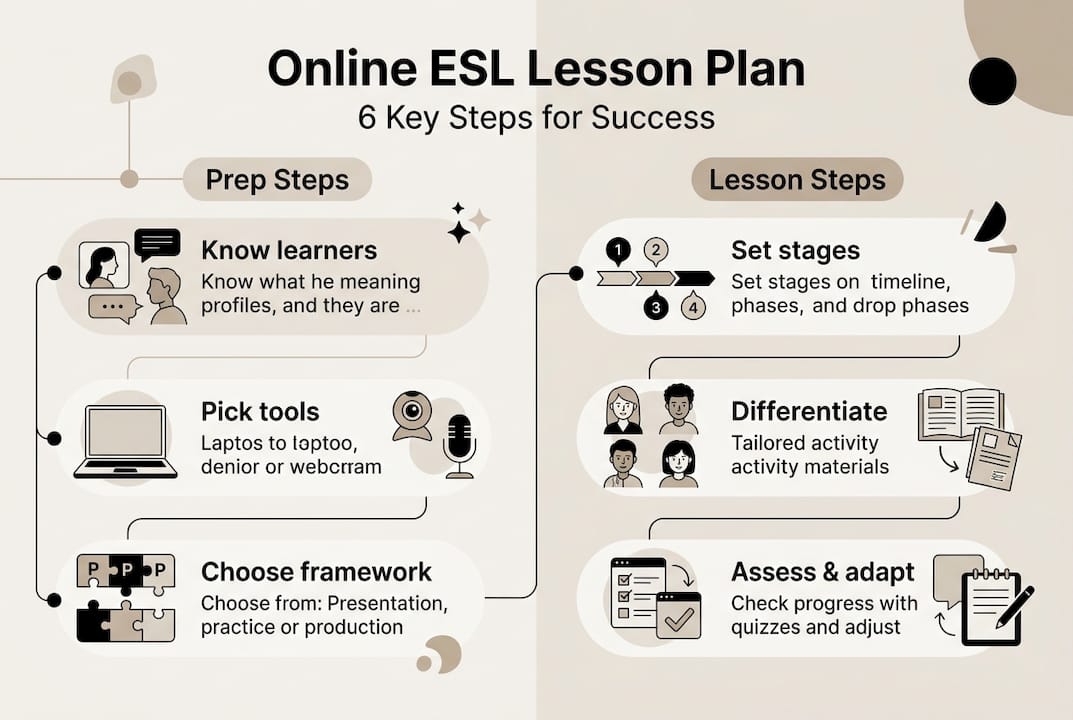
You open your laptop, ready to teach, and suddenly you’re juggling Zoom settings, lesson slides, a grammar worksheet, and three students who haven’t turned on their cameras. Sound familiar? Planning an online ESL lesson feels overwhelming until you have a clear system. Core components of an online ESL lesson plan include clear objectives, a materials list, staged timing, and digital tool adaptations. This guide walks you through every step so your next lesson runs smoothly and your students actually learn.
Table of Contents
- Understand your learners and objectives
- Gather materials and prep your virtual toolkit
- Choose your lesson plan framework: PPP, ESA, or TBL
- Break down the lesson stages for online engagement
- Differentiate and adapt for diverse learners
- Integrate technology and keep lessons flexible
- Assess student learning and refine your lesson plan
- Enhance your ESL teaching journey with expert resources
- Frequently asked questions
Key Takeaways
| Point | Details |
|---|---|
| Start with clear goals | Focus on student needs and set measurable objectives before planning activities. |
| Use the right tools | Select engaging digital platforms and always prepare backups for technology issues. |
| Structure lessons in stages | Divide your lesson into distinct, timed parts for warm-up, presentation, practice, and production. |
| Stay flexible and adaptive | Tailor your approach for different student levels and be ready to adjust on the fly. |
| Evaluate and improve | Assess learning throughout the lesson and refine your plan based on feedback and outcomes. |
Understand your learners and objectives
Every strong lesson starts before you open a single slide. You need to know who you’re teaching and what success looks like for them. Prioritize student needs assessment and flexibility over rigid plans, blending frameworks for online efficacy.
Here’s what to assess before you plan:
- Language level: beginner, intermediate, or advanced
- Learning goals: exam prep, conversational fluency, workplace English
- Background and interests: age group, cultural context, motivation
- Skill focus: speaking, listening, reading, writing, or grammar
Once you know your learners, write SMART objectives. That means specific, measurable, achievable, relevant, and time-bound goals. Instead of “students will practice speaking,” write “students will describe a past experience using simple past tense in a 2-minute partner activity.” That precision shapes every decision you make next. A solid ESL lesson planning workflow keeps this process consistent across all your classes.
“The best lesson plan is one built around your students, not around a textbook.” This mindset separates effective teachers from frustrated ones.
Pro Tip: For new student groups, send a short Google Form survey or a quick placement task before the first class. Even five questions about their goals and experience saves you hours of guessing.
Gather materials and prep your virtual toolkit
After clarifying your objectives, collect everything you need for a smooth online lesson. A lesson plan materials checklist keeps you organized and prevents last-minute scrambling.
Here’s a practical checklist:
- Lesson slides (clear, visual, not text-heavy)
- Digital handouts or shared Google Docs
- Video or audio clips (pre-tested for sound quality)
- Vocabulary cards or image prompts
- Backup offline activity or printable worksheet
Digital tools like Zoom breakout rooms, Kahoot, and shared documents dramatically boost engagement in online classes. Test every tool at least 24 hours before your lesson. Broken links and frozen screens kill momentum fast. Check out this ESL class setup guide for a full walkthrough of setting up your virtual classroom.
| Tool | Best use | Free option? |
|---|---|---|
| Zoom | Breakout rooms, video | Yes (limited) |
| Google Docs | Collaborative writing | Yes |
| Kahoot | Vocabulary quizzes | Yes |
| Padlet | Brainstorming boards | Yes (limited) |
| Nearpod | Interactive slides | Yes (limited) |
Pro Tip: Always have a backup activity ready. If your video won’t load or Kahoot crashes, a simple discussion question or quick writing prompt keeps the lesson moving without panic.
Choose your lesson plan framework: PPP, ESA, or TBL
Now that you’re ready with the right tools, it’s time to select the lesson structure that fits your class. Three frameworks dominate ESL teaching, and each has a different strength.
PPP is accuracy-focused for beginners, ESA works for engagement, and TBL builds fluency through real tasks. Here’s a quick comparison:
| Framework | Best for | Online advantage |
|---|---|---|
| PPP (Presentation, Practice, Production) | Beginners, new grammar | Clear structure, easy to follow |
| ESA (Engage, Study, Activate) | Mixed levels, motivation | Flexible order, high engagement |
| TBL (Task-Based Learning) | Intermediate to advanced | Real-world tasks, group work |
How to choose:
- Teaching a new grammar point to beginners? Use PPP.
- Working with a demotivated group? Start with ESA’s Engage phase.
- Running a project or role-play for advanced learners? TBL fits best.
- Blending levels in one class? Mix ESA with PPP elements.
Note: PPP can feel rigid and teacher-centered if overused. Rotate frameworks across lessons to keep things fresh and student-centered.
For more ideas on mixing ESL frameworks effectively, and to explore effective ESL methods beyond the basics, both resources are worth bookmarking.
Break down the lesson stages for online engagement
Once you’ve chosen your framework, flesh out each lesson stage for maximum online interaction. Timing matters more online than in a physical classroom because screen fatigue sets in fast.

A 45-60 minute lesson typically breaks down like this:
| Stage | Time | Sample activity |
|---|---|---|
| Warm-up | 5-10 min | Picture prompt, quick poll, or icebreaker |
| Presentation | 10-15 min | Teacher models target language with visuals |
| Practice | 15-20 min | Controlled exercises, gap fills, pair work |
| Production | 10-15 min | Role-play, discussion, or mini-presentation |
| Wrap-up | 3-5 min | Exit ticket, summary, or homework intro |
Switch tasks every 5-7 minutes for young learners to combat screen fatigue. Even adults benefit from activity changes every 10-12 minutes. Variety is your best engagement tool online.
Sample activities by stage:
- Warm-up: Show an image and ask “What do you see?” or run a 60-second vocabulary brainstorm
- Practice: Breakout room pair work with a structured task card
- Production: Students record a 1-minute voice memo or present to the group
- Wrap-up: One-sentence summary typed in the chat
For more engaging activities by stage and solid classroom management strategies for online settings, both guides offer practical, ready-to-use ideas.
Pro Tip: Rotate interaction formats throughout the lesson. Individual tasks, pair work, and whole-group discussion each activate different attention levels. Never stay in one format for more than 15 minutes.
Differentiate and adapt for diverse learners
Tailoring your lesson for different student types boosts both confidence and outcomes. One-size-fits-all planning is the fastest route to disengaged students.
Limit new vocabulary to 6-8 words per lesson for beginners. Overloading new learners with language is one of the most common planning mistakes. Quality over quantity always wins.
Here’s how to differentiate effectively:
- Lower levels: Add visuals, sentence starters, and word banks to every task
- Higher levels: Remove scaffolding and add open-ended extension questions
- Adult learners: Use real-life topics like emails, job interviews, or travel scenarios
- Young learners: Use games, songs, and movement-based tasks where possible
- Mixed levels: Design tiered tasks with a core activity and an optional challenge
Tech challenges and engagement barriers require tailored strategies, especially for students who struggle with the online format itself. Some students go quiet online not because they don’t know the answer, but because they feel exposed on camera. Build in low-stakes participation options like typed chat responses or anonymous polls. For more on managing diverse groups, the online class setup and online management tips guides cover this in depth.
Pro Tip: Assign roles in group tasks, such as timekeeper, note-taker, and presenter. This balances participation and gives quieter students a defined, lower-pressure contribution.
Integrate technology and keep lessons flexible
Embracing technology while staying flexible makes the difference between a good and a great online lesson. The goal isn’t to use every tool available. It’s to use the right tools for your specific lesson objective.
Use AI tools for personalization but ground every lesson in clear objectives and assessment. AI can generate differentiated reading texts, grammar exercises at multiple levels, or feedback prompts in seconds. That’s time you get back for actual teaching.
Practical digital platforms worth knowing:
- ChatGPT or similar AI: Generate tiered tasks, writing prompts, or quiz questions
- Quizlet: Vocabulary flashcard sets students can study independently
- Flipgrid: Students record short video responses for speaking practice
- Google Slides: Collaborative class presentations with real-time editing
Tech lag and screen fatigue demand backups and short tasks. Never rely on a single platform for your entire lesson. If Zoom drops, can you switch to a phone call and continue with a verbal task? Plan for that. Explore how AI in ESL teaching is reshaping lesson prep and feedback workflows.
“Flexibility isn’t a sign of poor planning. It’s a sign of experienced teaching.”
Pro Tip: Build one optional extension activity into every lesson. Fast finishers get a challenge, and you never scramble to fill unexpected extra time.
Assess student learning and refine your lesson plan
The last stage ensures your lesson truly delivers and prepares you for next time. Assessment doesn’t have to mean a formal test. It means checking whether your objective was actually met.
Series planning ensures skill balance and variety. Adapt based on assessment evidence from each lesson, not just gut feeling. What students produce tells you more than what they say they understand.
Quick in-lesson checks:
- Run a Kahoot quiz at the end of the presentation stage
- Ask students to type one new sentence using the target structure in the chat
- Use a thumbs up/thumbs down poll to gauge confidence
- Assign a mini-presentation or role-play as your production check
After-class reflection steps:
- Review student output: Did they meet the lesson objective?
- Note timing issues: Which stage ran over or under?
- Identify gaps: What do students still need to practice?
- Update your lesson plan with notes for next time
- Plan the next lesson based on what this one revealed
For lesson assessment ideas and lesson reflection tips that fit the online format, both resources offer structured approaches. You can also find activities for assessment that double as engaging tasks students actually enjoy.
Enhance your ESL teaching journey with expert resources
Building strong lesson plans is a skill that grows with practice and the right training behind you. If you’re ready to take your teaching to the next level, TEFL Institute offers structured courses and resources designed for exactly where you are right now.
Whether you’re just starting out or looking to specialize, explore TEFL courses in Newcastle for in-person options, or check out TEFL certification in NYC if you’re based in the US. Already certified? Browse course extensions to deepen your expertise in areas like young learners, business English, or IELTS preparation. Every lesson you plan gets sharper with the right foundation underneath it.
Frequently asked questions
What is the most effective ESL lesson plan structure for beginners?
The PPP framework is generally most effective for beginners because it’s structured, accuracy-focused, and easy to follow step by step.
How long should each stage of an online ESL lesson last?
A 45-60 minute lesson typically includes 5-10 minutes for warm-up, 10-15 for presentation, 15-20 for practice, and 10-15 for production.
Which tech tools are best for online ESL lessons?
Top picks include Zoom breakout rooms, Google Docs for collaboration, and Kahoot for interactive vocabulary games.
How can I adapt lessons for students with different English levels?
Use tiered activities with visuals and sentence starters for lower levels, and limit new vocabulary to 6-8 words per lesson for beginners.
What should I do if technology fails during a lesson?
Always prepare a backup activity. Tech challenges are common online, so a simple discussion question or offline task keeps the lesson on track.